# Submitting Leave Requests
### How to Submit a New Leave Request
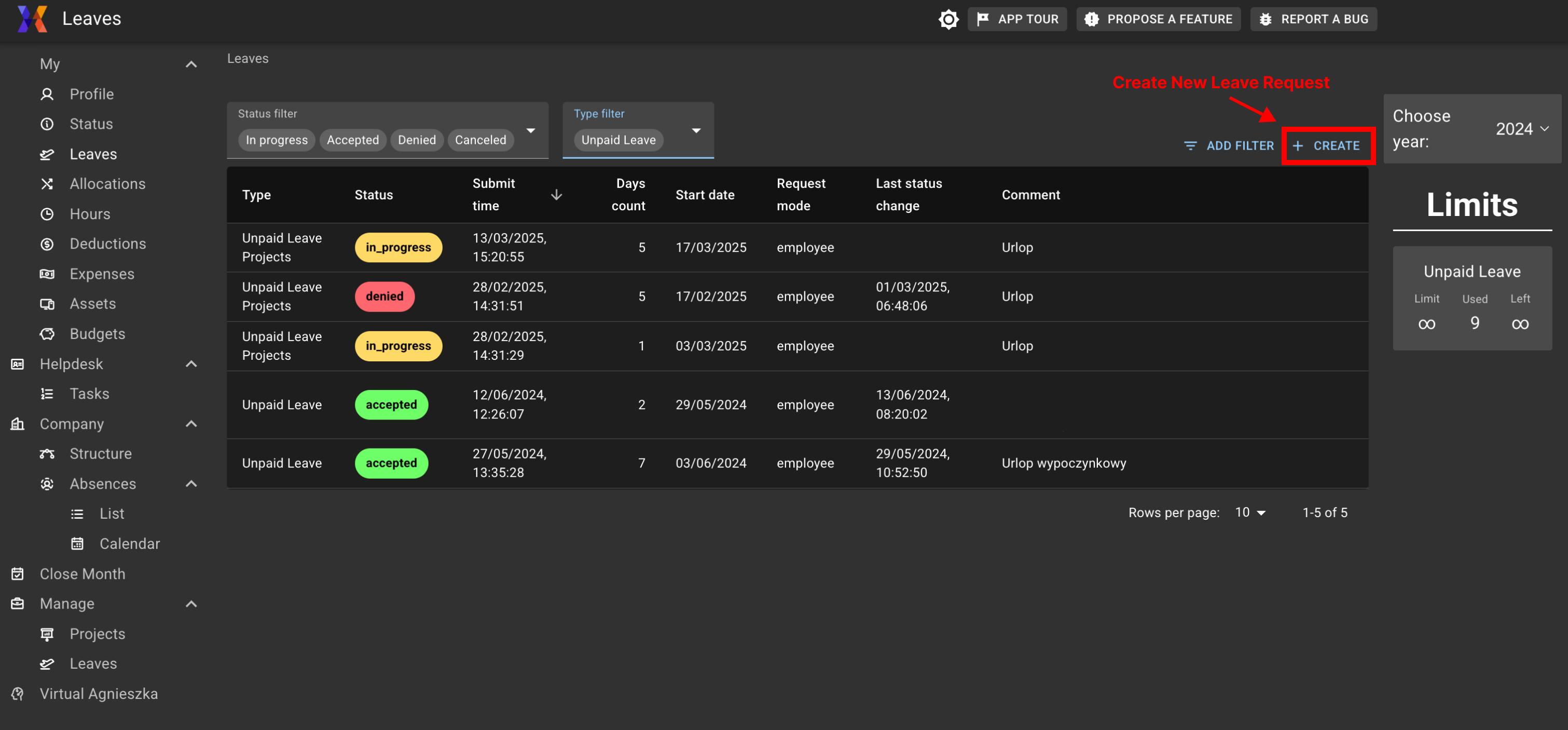
1. **Open the Leaves section**
Click on the “Create” button in the top-right corner of the Leave view.
Leaves view
1. **Choose the type of leave**
Use the dropdown to select the appropriate leave category:
* Paid leave
* Unpaid leave
* Sick leave
* Special leave (e.g. parental leave)
2. **Pick your leave dates**
Use the interactive calendar to select the days you want to take off. Simply click on the dates — selected days will be highlighted.
3. Add a comment
Enter a short explanation or reason for your request. This helps your manager or HR understand the context, especially for special types of leave.
4. Attach supporting documents (optional)
For some types of leave (e.g. medical leave or special approvals), you can upload a file — like a doctor’s note, approval email, or official statement. Drag and drop your file into the upload area or click to select a file.
5. Review leave limits
On the right side of the form, you’ll see how many days you’ve used and how many you have left.
6. Submit your request
Once everything is filled out, click “Save” to submit. The system will send it for approval to your designated approver (e.g. manager or HR).
### What Happens Next?
* Your leave request is saved and appears in your Leave Overview table
* You’ll receive a status update once your request is reviewed
* You can track approvals, rejections, and pending actions in real time